Step-by-Step Migration
Create an Integration, Copy the API Key
Request your tenant invite (contact us — registration is invite-only during the pilot; the welcome email includes the mobile setup QR code). Then open Integrations in the dashboard and create an API integration. Copy the key — the primary auth header is Authorization: OpsPingKey <key> (or X-OpsPing-Key: <key>). Your existing Authorization: GenieKey <key> header keeps working for drop-in compatibility — both are accepted.
# Primary header:
Authorization: OpsPingKey abc123-def456-ghi789
# Also accepted:
X-OpsPing-Key: abc123-def456-ghi789
# Drop-in compatibility — your existing header works as-is:
Authorization: GenieKey abc123-def456-ghi789Repoint the Base URL
The OpsPing API is a drop-in replacement for OpsGenie's v2 alert API — same paths, same request/response format, same status codes. Change the base URL in each integration and you're done. (EU region: api.eu.opsgenie.com migrates the same way.)
Import Your On-Call Data
The repo ships an importer at scripts/opsgenie-import.ts. Point it at your OpsGenie account and your OpsPing deployment; it recreates, in dependency order: users → teams → services → schedules (with rotations and overrides) → escalations → heartbeats → integrations. Run --dry-run first to see the plan, and pass --include-alerts if you also want historical alerts. It's idempotent — existing OpsPing resources are matched by name and skipped.
OG_API_KEY=<opsgenie-key> \
PAGER_API_KEY=<opsping-key> \
PAGER_API_URL=https://api.ops-ping.com \
npm run opsgenie-import -- --dry-runVerify with a Test Alert
Send one alert through each repointed integration. Check that priority, tags, responders, and custom details arrive correctly in the OpsPing dashboard. Because the API is format-compatible, most integrations work on the first try.
curl -X POST https://api.ops-ping.com/v2/alerts \
  -H "Authorization: OpsPingKey YOUR_API_KEY" \
  -H "Content-Type: application/json" \
  -d '{
    "message": "Test alert from migration",
    "alias": "migration-test-01",
    "priority": "P2"
}'Cut Over SMS → Push
Have the team install the OpsPing mobile app and enable push — iOS critical alerts and Android DND-bypass are free and unlimited on every plan. Keep SMS/voice as a P1-only fallback: it's billed at provider cost against your included monthly flex credit, with a hard cap you set so the bill never surprises you. Details on the pricing page.
What Transfers — and What Doesn't
| Capability | Migrates? | Notes |
|---|---|---|
| Alerts & lifecycle (ack/close/snooze) | ✓ Yes | Identical v2 payload format |
| Integrations & webhooks | ✓ Yes | One-line URL change; GenieKey header unchanged |
| Schedules, rotations & overrides | ✓ Yes | Imported by scripts/opsgenie-import.ts |
| Escalation policies | ✓ Yes | Imported by the script |
| Teams & users | ✓ Yes | Imported by the script, matched by name |
| Heartbeats | ✓ Yes | Same ping format |
| Email integrations (@opsgenie.net) | ✓ Yes | Every OpsPing integration gets an @alerts.ops-ping.com address — see Email-only tools below |
| Alert policies (noise rules) | ✗ Manual | Recreate in the Policies UI and verify with dry-run before cutover — see Reproducing Alert Policies below |
| Opsgenie Edge (on-prem agent) | ✗ No | OpsPing is a hosted service; private single-tenant deployments are available (see FAQ) |
| JSM-only features | ✗ No | Jira Service Management incident tooling is Jira-side; OpsPing is paging-first, not a JSM replacement |
| Opsgenie analytics / reports | ✗ No | OpsPing has its own team-scoped reports |
API Compatibility Reference
| Endpoint | OpsGenie Compat | Notes |
|---|---|---|
| POST /v2/alerts | ✓ Full | Identical payload format to OpsGenie |
| GET /v2/alerts | ✓ Full | Query params match OpsGenie |
| POST /v2/alerts/:id/acknowledge | ✓ Full | |
| POST /v2/alerts/:id/close | ✓ Full | |
| POST /v2/alerts/:id/snooze | ✓ Full | |
| GET /v2/schedules | ✓ Full | |
| GET /v2/heartbeats/:name/ping | ✓ Full | Heartbeat format identical |
| POST /v2/incidents | ✗ No | Incidents are OpsPing-native, not part of the OpsGenie compat layer |
Integration-Specific Instructions
Datadog
In your Datadog Integrations → OpsGenie tile, update the Service URL from https://api.opsgenie.com to https://api.ops-ping.com. Your routing keys and payload format stay the same.
Prometheus Alertmanager
Update the opsgenie_config block in your alertmanager.yml: change api_url to https://api.ops-ping.com. The OpsGenie receiver in Alertmanager is natively compatible.
Grafana
In Grafana Alerting → Contact Points, edit your OpsGenie contact point and change the URL field to https://api.ops-ping.com.
Email-only tools (replaces @opsgenie.net addresses)
Backup jobs, hardware monitors, and older cron tooling often can only send email. Opsgenie gave those an @opsgenie.net address per integration — OpsPing does the same: every integration gets a unique inbound address, <integrationId>.<token>@alerts.ops-ping.com, shown on the integration's page under Inbound endpoints. Repoint the tool's recipient and you're done:
[P1]–[P5]subject tags set the alert priority (default P3)Re:/Fwd:prefixes are stripped, so reply chains map to the same alert- Message-ID dedupe stops mail-server retries from double-paging
Reproducing Alert Policies
Opsgenie alert policies (the global/team rules that suppress, re-prioritize, or auto-action alerts) don't export through the v2 API, so they're recreated rather than imported — for most teams this is a 15-minute job, and it's worth doing before cutover:
- Same building blocks: conditions on priority, source, tags, entity, and message content (incl. regex); actions to suppress, delay, auto-acknowledge, auto-close, re-prioritize, or add tags
- Same semantics: policies are ordered, first match wins — recreate them in the same order you run them today; team-scoped policies map to OpsPing teams, global policies stay global
- Verify before you cut over: the Policies page has a dry-run panel — paste a sample alert payload and it shows exactly which policy in the chain would fire and what it would do, without touching a live alert
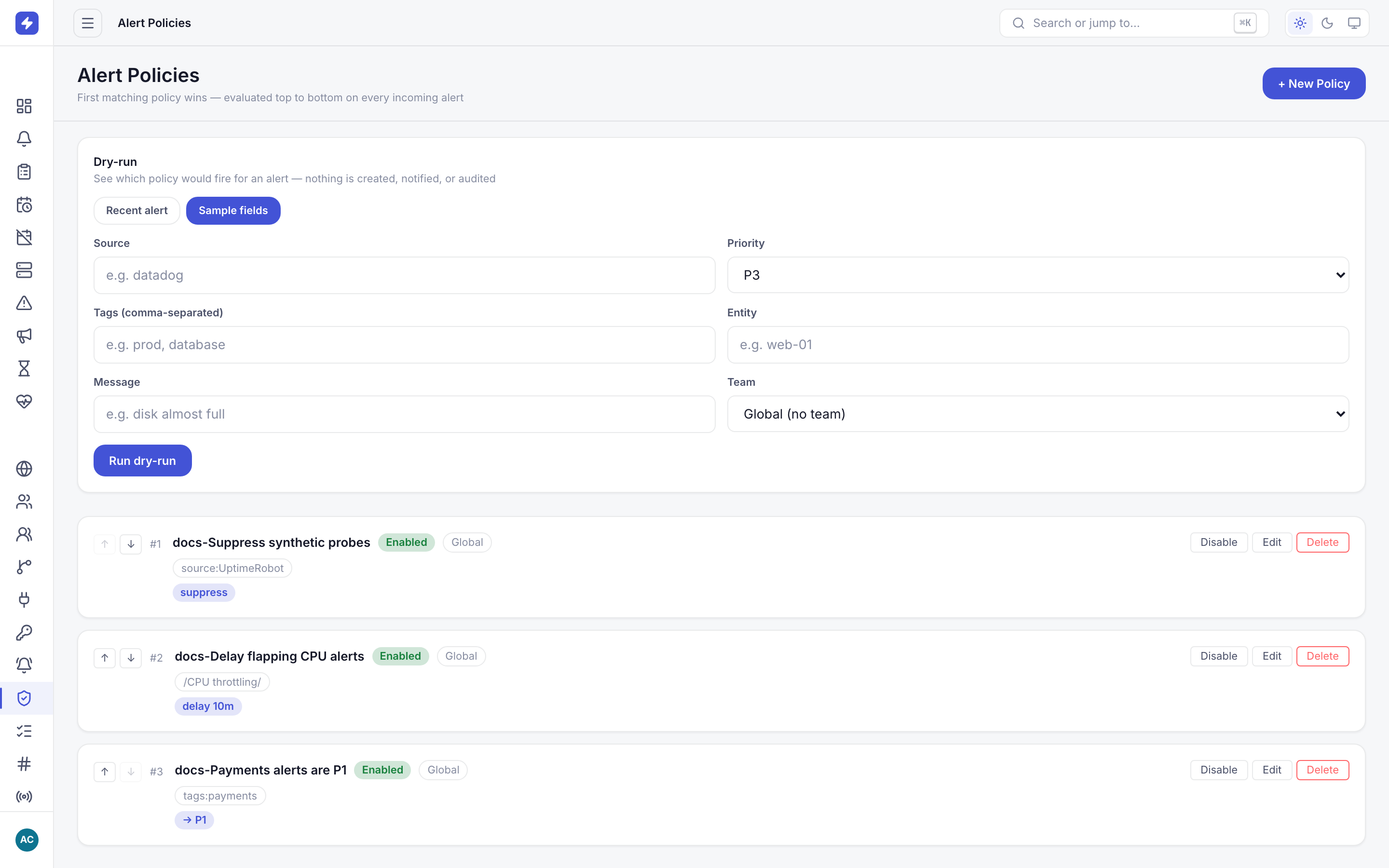
Full reference: Alert Policies and the policies guide.
FAQ
Do my existing OpsGenie Terraform / API scripts work?
Yes — if they use the v2 alert API shape and the GenieKey header. Just adjust the host: for the OpsGenie Terraform provider, set the OPSGENIE_API_URL environment variable to your OpsPing base URL and your existing configuration applies unchanged.
What about SMS and voice?
Push is free and unlimited on every plan, including iOS critical alerts and Android DND-bypass. SMS/voice is an optional P1 fallback billed at provider cost — no markup — against an included monthly flex credit ($5 on Team, $25 on Business). You set a hard monthly cap, so there's never a surprise bill. See pricing.
Can I run OpsPing in my own environment?
Yes — as a private, single-tenant deployment. The backend is a single Node.js service backed by DynamoDB, so it runs comfortably on your own infrastructure or in a managed private setup we operate for you. Point your integrations at your deployment's URL and the same GenieKey-compatible API applies. Contact us to discuss a private deployment.
Need Help?
Migration support is free for all plans. Contact us or email migration@ops-ping.com — we'll walk you through it over a call or async.
Coming from Grafana OnCall instead? See the Grafana OnCall migration guide. Wondering why OpsPing won't pull the same rug? Read the OpsPing pledge.